Pages

Wednesday, 31 May 2006

Reverse culture shock

Why do you want to go to an overseas country for your vacation? It's full of foreigners!
Mic (my lecturer's British friend)

(Mic's only kidding in the quote above, not being xenophobic or anything.)

My friend profar is Oregon now on a work assignment. He left earlier this month to help his company to develop something that will hopefully make them richer than they are now.

In this week's Human Resource class, we learned about something called reverse culture shock. It is when a worker upon returning to his native country experiences difficulty adjusting to his local country's environment. This can happen to anyone, especially when the country is undergoing rapid growth.

My lecturer gave an example of when she came back from Scotland, she was annoyed by the unprofessionalism showed by the local bank staff and cashiers, how they took their own sweet time to do their job and how they overtly showed annoyance when they have to move from where they were sitting in order to fulfill a customer's request. She was used to the efficiency level of the Scotish workforce that it annoyed her a whole lot for some time.

But my friend, the engineer of the class, has a different theory about reverse culture shock. He argues that 'reverse culture shock' is experienced by the local people, not the foreigner. According to him, when a foreigner comes to America and turns out to be more American than the Americans themselves, the shock that the Americans feel when they see the highly Americanised foreigner is what 'reverse culture shock' is.

I hope you, profar, are not causing the Oregonians any 'reverse culture shock', dude.

Sunday, 28 May 2006

In the time of computer crises


Access control, by ArminH ( www.sxc.hu)

I'm writing this on my Pentium III laptop, over a dial-up connection and using the out-dated Firebird browser (the early name of the Firefox browser).

My Athlon XP desktop PC went batty a few weeks ago, as a result of a sudden blackout (I can tell you that there's no quicker way to mess up a Win XP computer than to shut it down abruptly). The registry is now corrupted, making it impossible to start up, and barring me from my broadband connection. I have no choice but reformat the C: drive partition, but first I have to backup some 'important' files. I asked the Bro who agreed to help me if he has any extra 10 gigabytes to spare. 10 gig? You have of a lot of songs?, he asked. No, they're video files, I said. The complete season of Honey & Clover (all 24 episodes that took nearly a week to download) and the 4-part Black Jack: The 4 Miracles of Life, to be exact. But I'm not planning to share with him the exact details.

My tries to resuscitate my PC was met with little success. I scoured the Internet for answers, and with my limited knowledge, I realised that there is so much I don't know. Even after 5 years studying computers in graduate school.

This problem forced me to try something I feared a lot: the command prompt. It brought me back to the heydays of DOS, when I was in the later years of primary school and when the support for the mouse was limited and most functions were executed using keyboard strokes. In the command prompt, all we see is a black screen and white lines of text where results and typed-in commands are displayed. It's scary in the sense that you're unsure of what you're supposed to do next, the little amount of help available and the thought of potentially doing any irreversible damages. All you have is a bleak black background with cryptic white text staring back at you, all waiting for you to mess up spectacularly.

Working with the command prompt, according to my Eritrean friend (he's a big Linux fan), is the way power users use their operating system. He's kinda right, I think, because when I was typing commands in the command prompt, I kind of feel like I'm a hacker.

The experience allowed me to reduce my fears of the command prompts. It is not to be feared, but to be appreciated for its usefulness that it has over the normal Windows environment. Plus, it's probably the closest thing to being a computer hacker for me.

Alhamdullillah, I still have my laptop. I can still carry on doing my work without much hassle, although my laptop has lost most of its mobility. If you're compassionate about the condition of computers, you'll likely to cry yourself a lake once you look at my laptop. It looks as if it has been used by a reporter who came back from a long assignment in Kabul or Baghdad and has survived several bombings.

A few days ago, my thumb drive was infected by a worm from a friend's laptop, which consequently infected mine. It's a pretty sneaky fella, one that disguises itself as a hidden file and making us unaware of its presence. It attacks Microsoft Outlook but thankfully I'm not using it.

The support page from Symantec described how it attacks and how to remove it. It seems to be able to alter some of the Windows registry settings, and making itself reappear in different parts of the hard disk. That's why I called it 'sneaky'.

This episode taught several lessons that I would probably never learn if my laptop is all right. I learned how to use the msconfig to make my laptop to start in safe mode and the regedit to view, edit and backup my registry.

I'll admit there were times when I wanted to give up, and times when I looked at people with their laptops, without any corrupted registry or worms to ruin their day, with a slight feeling of jealousy.

However, I do believe that I've learned a lot from what has happened. I learn to care for and repair my machines and I may use this newly-learnt skill to help others, if they need any. Although I don't anybody who would, they all seem happy typing away and checking emails on their uncorrupted, wormless laptops. They're so lucky.

I know because I am too, but in a different sort of way.

Tuesday, 16 May 2006

The last time I had cake

During last night's class, my classmate Z celebrated her birthday. She didn't plan it, it was the other classmates who decided to bring cake, paper plates and serviettes. It was actually a 'there and then' thing, they heard that it was her birthday and ran to the nearest shops just before class. I only brought textbook and myself.

Halfway through class, cake slices were distributed. It was my dinner. A lovely chocolate cake sponge cake with chocolate cream and bittersweet chocolate chips.

It was also the first cake I've had in long time. Come to think of it, it was the first birthday celebration I attended in years. Well, not attend, but rather, 'happened' to be there. But in truth, rezeki, actually.


Sorted under:

Saturday, 13 May 2006

I made headline

Yeah. Literally.


[ Newspaper snippet generator ]

Monday, 24 April 2006

Parting, temporary and permanent

Innalillahi wa inna ilayhi raji’un. To Allah we belong and truly to Him we shall return. [Surah al-Baqarah, 2: 155-156]

Yesterday maternal grandfather passed away. He was surrounded by his dearest family members. Unfortunately, I couldn't be there due to another family-related reason. He is my real life hero. May Allah place my grandfather among the obedient and grant him mercy and forgiveness. Amin.

I'm planning to take a break from writing here for awhile. I have many things to take care of in the present and coming weeks. I would like to thank everyone who visited here. I hope you have gained something useful from my scrawlings and ramblings.

Thank you again and take care. I appreciate all your support.

Sunday, 16 April 2006

Open source and freeware for the artistic soul

Some people think you absolutely need commercial software to produce good quality digital art. Well, not quite, IMHO. I'm here to introduce to you some of the open source and freeware available for any of your creative needs. You can download, install and start using them without getting up to reach for your wallet or purse.

Please note that all of the following software were written based on the Windows-based version.

GIMPshop
My original purpose for GIMPshop was to make the Gimp accessible to the many Adobe Photoshop users out there. I hope I’ve done that. And maybe along the way, I can convert a Photoshop pirate into a Gimp user.
Scott Moschella
GIMPshop is actually The GIMP (GNU Image Manipulation Program) that was redesigned by Scott Moschella to look and feel like Adobe Photoshop. Major difference: Photoshop is expensive and GIMP is free. GIMPshop is an excellent all-round photo editor which can basically do most things that Photoshop can. You can use it draw moustache on the picture of your favourite dictator, create a picture selective colourisation or touch up any digital pictures you've taken.

For some context on GIMPshop and Photoshop differences, please read Chad Smith's discussion on GIMPShop versus Photoshop.

Portable GIMP
Portable GIMP is The GIMP in its original look, but in a smaller size that you can install in a USB drive. Now you can take The GIMP with you and draw moustache on the picture of your favourite dictator on your friend's PC.

Inkscape
At long last, an open source software for drawing SVG (scalable vectors graphics). SVG is great for line diagrams, logos, symbols and anything that uses text in it. The current version is user-friendly enough to get most people into drawing their first SVG. Drop by Tavmjong Bah's A Guide to Inkscape site, it's one of the best places to cure you of any Inkscape cluelessness.

Paint.NET
Paint is the default bitmap drawing utility that comes together with Windows. But if you want extra firepower, then Paint.NET is what you need. Designed to be a replacement for Paint, Paint.NET has the capability to create layers, unlimited undo and a host of filters for creating special effects. If you want to do basic photo and bitmap image editing and you find The GIMP to be complex, Paint.NET could be the tool for you. However, it's only for Windows 2000 and XP users and requires .NET Framework 2.0 installed in order for it to work.

Artweaver
This software has one of the best set of painting tools. It simulates the natural brush tools like brushes, chalks and charcoal rather well. Artweaver is best for digital painting, and if you have something like a pen tablet, you'll be having hours of fun painting on your PC. Works well with the mouse too and doesn't leave paint all over your hands and clothes.

FontHit
Finding the right font can be less of a chore with FontHit. FontHit lists down all the fonts installed on your PC in a preview form, allowing you to pick easily the ones you want to use. It's small in size and an indispensable tool for working with text.

Dropper
Found a colour you like on a website or program and you want to know its value? Dropper can help. Dropper is small drag tool that tell you the value of a colour the pixel on your screen in RGB (both hexadecimal and decimal), COLORREF (useful if you're a developer) and HTML by simply dragging the dropper icon over it.

ColorPic
A similar colour tool to Dropper, but the added feature of creating your own palette. Now you group the colours you like of any theme. Great for discovering colours for shading and shadow effects. Photoshop-Weblog.de calls it, "Ein geniales kleines Programm! (an ingenious small program!)" I'm inclined to agree.

Blender
If working in 3D is more your cup of tea, then you wouldn't want to give Blender a miss. It is an open source 3D modeling, animation, rendering, and playback software that can be be used and distributed fully free within any educational, professional or commercial environment. Check out the gallery section of the Blender website to see some of the awesome stuff that people have done using it.

Audacity
Sonicsmiths, rejoice! The open source world has not left you forsaken. This free, cross-platform sound editor is the forge where you can record live sounds, work with various audio formats like MP3, WAV and the open source Ogg Vorbis format and splice, cut and mix sounds together whenever the DJ fever hits you.

Caveat: Fair warning, folks. Using open source and freeware requires courage.

A software is only useful when you know how to use it. Unfortunately, most software aren't intutive, which means you can't figure out how to use by simply looking at the interface and playing around with the tools. This is especially true for a powerful and feature-rich programs like GIMPshop, Blender or Audacity.

There are many books written on commercial software like Photoshop or 3D Max, but only a few are available of freeware and open source software. So is the number of forums and websites catering for the freeware and open source software crowd. This can dampen your spirit sometimes.

But don't let that scare you. Help is around, if you're willing to be a bit patient. By this I mean visiting and participating in forums, reading the manual and help files, searching for examples on tutorial websites and spending some time on trying out what you've learnt.

Like learning anything else, the time taken and the steepness of the learning curve varies from one individual to another. A program that I find easy to use may not be so for you.

Rather than going for all form of creative endeavours, try to narrow down on form that you like most. A focused effort is often better than spreading yourself thinly, skillwise.

Photo, bitmap images editing/manipulation: GIMPshop, Paint.NET
Line art, SVG, diagrams: Inkscape
Digital painting: Artweaver
3D stuff: Blender
Audio tinkering: Audacity

I mostly use Inkscape because I like working with SVG. I also have other programs installed because sometimes Inkscape can't produce the output that I want. For an overexposed photo, I use The GIMP to correct it first before I import it into SVG using Inkscape. Similarly, working text is easier in Inkscape where I edit them first there before I paste them into any image using The GIMP. In short, it's good to be versatile.

Remember to check software license on its official website. This rule especially concerns freeware, because some freeware are only allowed for non-commercial uses. Licenses differ according to the terms cited by the respective developers, so never assume. The best thing is to check and be sure.

Also, check your own PC's amount of RAM and hard disk space. Software like these are monstrous RAM consumers, and anyone with anything smaller than 256 MB RAM could be in for some painful moments. Allow some space in your hard disk for saving your digital masterpieces as they can be large in size sometimes, depending on the type and complexity. Always keep an eye on your level of available free space or risk yourself having to deal with a slowed down PC.

I hope you now have some idea on how to turn your PC into a digital studio. The list above is not by any means exhaustive, there could be other (or even better) alternatives out there that I haven't found out yet. Do share with us any experience or info that you have.

Selamat berkarya!

(This post was written with the help of Ask the eConsultant's I want a Freeware Utility to ... 300+ common problems solved)

Tuesday, 11 April 2006

Accidental encounter with a former super

Last week, I ran into my former project supervisor at the library. Oh no, I thought. At first.

Please don't get me wrong. My supervisor is a great guy. But the project my partner and I did with him was, well, a tragedy of sorts. We wrote a software that crashed minutes before we presented it. And you know you've hit rock bottom when when the nicest, friendliest, most understanding lecturer in the department asks you conclude your presentation when you barely made it half way through. It was a major blow to our morale.

Fortunately, we got to present for a second time, this time for an even smaller audience. Our supervisor gave us the detailed walkthrough of our 'list of mistakes'. I almost swore at the time to never do any programming for as long as I live.

So I hope you see now why I'm a bit adamant about saying hi. However, through the unexplainable miracle of God, I went to him anyway and surprise him (and myself as well). He hasn't seen me in a year or so.

SV: So, what are doing here? Still not finished, eh?
Me: Ehehe... (nervous laugh)

Selamba orang tua ni, kata aku tak grad lagi...But that is his brand of humour.

Me: I'm doing my post graduate now, but over at the other department.
SV: Ah, I see. So now we're colleagues.

He said, "we're colleagues now!" I almost fainted when I heard that. He's also a post graduate student but he's attached as a teaching staff.

We talked for awhile about our personal lives and I realised how he used to advise me on things other than the project, like never spend more time with the PC than with the wife when you're married, and other pearls of wisdom.

Me: How's your post graduate thesis?
SV: Look at this. I don't know what they all mean. Headache.

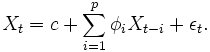
He was actually referring to the equations used in ARMA or autoregressive moving average model. It's a very, very advanced method for digital signal processing. One of its possible application is for MRI in medical diagnostics.

I was actually surprised to see someone like him feeling challenged about something like this. I used to think that I was never smart enough to make sense of all these equations. All the integrations (pengamiran, if you still remember them from your Add Maths classes), all the variables and whatnots.

Lovely, isn't it?

After we ran out of topics, we decided to wish each other all the best and let him return to his library research so he can solve his current problem, finish his thesis and graduate.

On hindsight, I'm glad that I stopped by and said hi to him. I felt like things turned sour after our tragic project, but he assured me that it was all in the past and the best thing to do is to learn from the experience.

And to not do that would be a greater tragedy.

Wednesday, 5 April 2006

OpenOffice.org 2.0 help


If you think OpenOffice.org can't hold a candle to Microsoft Office, then this lady could convince you otherwise. Solveig Haugland's blog is loaded with example of things you can accomplish with this open source office productivity suite. You'll be surprised, I'm guessing. I know I was (and still am, actually).

[ OpenOffice.org Training, Tips, and Ideas ]

Friday, 31 March 2006

Working in groups part 2

In last night's Strategic Management class, we had a rather fiery group-against-group discussion on a US telco called Nextel. Definitely one of this semester's most intense battle of wits (IMHO anyway).

Our lecturer, Dr. Y, has randomly sorted us into 5 groups and to my surprise I ended up with two of my former group mates from last semester (but actually it's relatively a small class). The team is completed with two other members, a new student form last semester's intake and a teacher with a rock star's hair from Maldives (he said he would never be allowed to grow his hair that way if he were teaching and his wife thinks it's very cool).

My Maldives friend is well known for his questioning ability. His questions will usually make the recipients (including lecturers) sit or stand uncomfortably or be taken aback for a moment, pausing in thought. You wouldn't expect anything less from a teacher now, would you?

The new student is an akak whose's also a teacher, I think. We haven't talked outside the group yet.

As for my old group mates, I owe them for what they taught me last semester. They help me to view things in the real world situation. I can be a bit too idealistic at times and we argued a lot (constructively, of course). But I admire their cooperativeness and analytical abilities. They're incredibly insightful people.

The others group are nothing to sneeze at either. They comprise of highly intelligent and capable people of tremendous experince from various industries. Needless to say, our Thursday nights won't be the same again. At least for several weeks to come.

Tuesday, 28 March 2006

Have you read a single word I wrote?

One of the books I'm reading right now is about a middle-age, childless housewife and charity program volunteer living in London whose husband left her for another man and is slowly spiraling into insanity. I have nothing much to relate to her with, except maybe for the spiraling part.

The story is told in a series of letters, written by her to a neighbour, Joan, who happens to have abandoned her family (for some unexplained reasons) to travel the world alone and manages to end up in places like Dacca (Dhaka, Bangladesh), Kurdistan (maybe when the country still existed) and Prague. But as the reader, we have no clue of Joan actually receiving the letters, let alone reading them.

It's a second-hand book I bought last year. When I got it, I have no idea what was waiting between its covers.

I'm going to continue reading it for a few reason. One, it won a major award. I want to how good it is as a novel. Two, it somehow takes me into the mind of the lead character, Eliza: a middle-age woman, emotionally marooned, with no means of to support her life, unconfident and gives herself to others around her with no idea what she should receive in return. Third, I bought it, so I might as well read it.

The more I think I of it, the more I'm convinced that I've come across a few Elizas in my life so far. They may not live in London, volunteer to clean the bedpans of the dying during their free time or have a husband who likes other men, but I think I know that they feel very much like what Eliza does. Half-way through life with a little sense of what is going on and is supposed to happen.

Usually I read non-fiction stuff and it's been a quite awhile since I've read anything fiction. I may not be able to relate entirely to Eliza character, because of the different background and values, but at least now I have a bit of an idea what the Elizas of the world are going through. We may not the solution to the problems of the Elizas in our life. But the least we could do is offer them a listening ear over the phone, or over a cup of warm tea.
Related Posts with Thumbnails
 
Copyright 2009 introspector. Powered by Blogger Blogger Templates create by Deluxe Templates. WP by Masterplan